
Onoco - Shareable Baby tracker
Onoco LimitedParenting
4.449.00 Reviews
- Version
- 1.21.1
- Installs
- 10.00K
- Age Rating
- Everyone
Screenshots
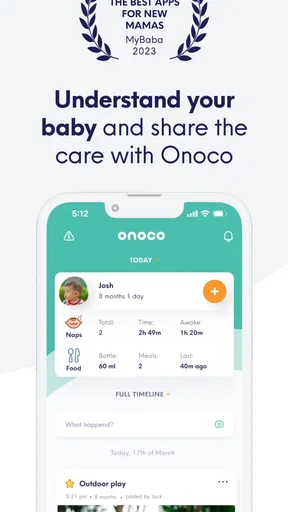

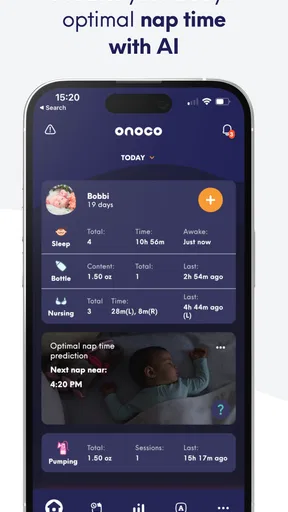
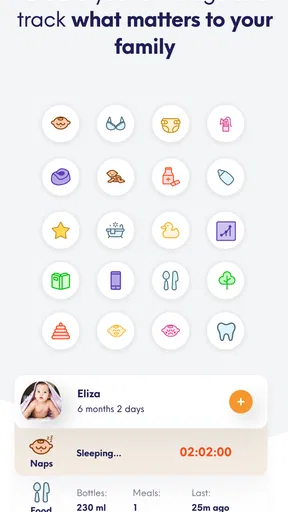
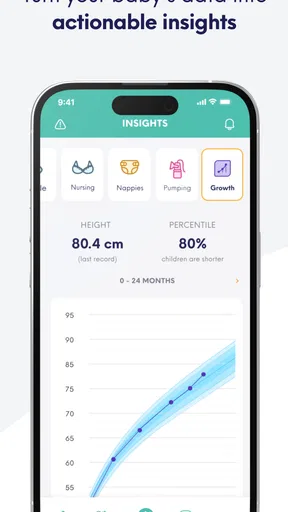
Our Review of Onoco - Shareable Baby tracker
 Analysis by Appyee
I came to Onoco looking for something more practical than a simple feeding or sleep log. Parenting apps often help one person record events, but family life rarely stays with one person. A baby may be with a parent in the morning, a grandparent in the afternoon, and another caregiver at night. The useful question is not only “what happened?” but also “who needs to know, and what should happen next?”
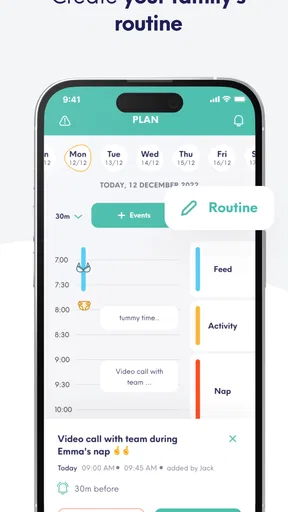
That is the space this free parenting app tries to cover. Onoco combines baby tracking with family organisation, a development plan, and a smart schedule. In my experience, that combination makes it more interesting than a basic diary, especially for households where care is shared. It is not a replacement for medical advice, and it will not remove the unpredictable parts of looking after a baby, but it can reduce the small communication gaps that create unnecessary stress.
The app is made by Onoco Limited and is available for Android devices running at least Android 7.0. It is rated for Everyone, which fits the straightforward family-focused purpose. The app has a 4.4 average from around 423 ratings, with roughly 49 written reviews, and has passed 10K+ installs. Those figures suggest a modest but established user base rather than a huge mainstream service.
How Onoco fits into a real family routine
The strongest way to understand Onoco is to imagine a normal day rather than a perfect one. I might record a nap in the morning, another caregiver might need to know when the baby last fed, and a partner returning from work might want a quick picture of how the day went. A shared tracker can make those handovers less dependent on memory, messages, or a notebook left on the kitchen counter.
That shared approach is more valuable when the baby has an irregular rhythm. Instead of treating each event as an isolated entry, I can use the record to notice patterns and plan the next part of the day. The app’s family-organiser angle also gives it a wider purpose: it is not only about collecting information, but about making that information usable by the people involved in care.
I would not describe it as a fully automatic parenting assistant. A smart schedule still depends on accurate entries and sensible interpretation. Babies change their routines quickly, and a schedule that looks helpful in the morning can be irrelevant by lunchtime. I found the best mindset was to use the plan as a flexible guide, not as a timetable that the baby is expected to obey.
Tracking is most useful when more than one person participates
A solo parent can still benefit from a central record, but the real advantage appears when several trusted people contribute. The practical gain is not simply that everyone can see the same information. It is that the family has one shared version of events. That can prevent repeated questions such as when the last nap ended or whether a routine task has already been handled.
There is also a useful emotional benefit. When I am tired, remembering details is harder than it sounds. A clear record can take pressure off my memory and make a handover feel more confident. This is particularly helpful during busy transitions, such as leaving the baby with a relative or moving between home and childcare.
At the same time, shared access requires discipline. If one person records every event and everyone else assumes the information will appear automatically, the system becomes incomplete. I would agree with the other caregivers on a simple routine: record important events shortly after they happen, and use the schedule as a conversation aid rather than treating it as an authority.
The development plan adds context instead of just more entries
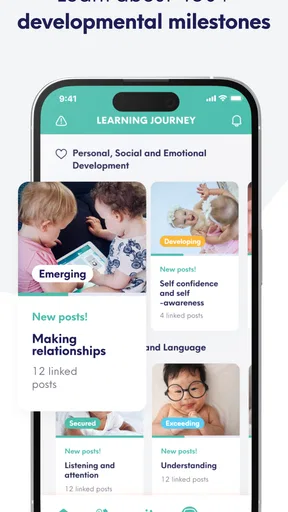
Many baby trackers become lists of times and quantities. Onoco’s development-plan element gives the experience a broader direction. It encourages me to think about the baby’s changing needs and daily progress rather than viewing the app as a digital spreadsheet.
That can be helpful for parents who want gentle structure but do not want to build their own system from scratch. It may also give caregivers a shared language when discussing what to focus on during the day. The important distinction is that a development plan should support observation, not create anxiety. Babies do not all follow the same pattern, and an app should never turn normal variation into a reason for panic.
I would use this part as a prompt for planning small, realistic activities and noticing changes over time. I would not use it to diagnose a developmental issue or to decide whether professional advice is necessary. If something concerns me, a health professional remains the right person to ask.
Why the smart schedule needs a flexible approach
The schedule feature is appealing because it addresses one of the hardest parts of early parenting: knowing what might come next while accepting that plans often change. A suggested rhythm can help organise a day with several caregivers, especially when everyone is trying to avoid overlapping naps, missed routines, or rushed handovers.
Its value depends heavily on the quality of the information being entered. If naps or feeds are recorded late, the schedule may not reflect reality. That is not necessarily a flaw in the idea, but it is an important trade-off. Convenience comes from having a central record, while accuracy requires consistent use.
My practical tip would be to start with only the events that genuinely affect the next handover. Trying to document every minor detail from the first day can make any tracker feel like work. Once the routine feels natural, I would add more information if it helps reveal a useful pattern.
What the current app experience suggests
The current version is 1.21.1, which indicates that Onoco has moved beyond an initial launch build. The app first appeared on September 30, 2020, so it has had time to develop its central idea of combining tracking and coordination. I see that evolution as important: the product is not presenting itself as only a newborn log, but as a continuing tool for organising family care.
That does not mean every part will suit every household. A mature version can still have friction, and the more areas an app covers, the more important it becomes that the interface stays quick. Parents usually open a tracker while holding a baby, carrying something, or working with limited attention. If recording an event takes too many steps, the shared record loses its value.
For existing users, the main benefit of the product’s broader direction is that their information can serve more than one purpose. A feeding or sleep entry is not only historical; it can contribute to a conversation about the rest of the day. The family-organiser layer also makes the app more useful as the number of caregivers increases.
There is a possible downside to that breadth. Someone who wants only a fast, private sleep timer may find the wider planning approach unnecessary. In that case, a focused tracker with fewer screens could feel faster. Onoco makes more sense when the user wants coordination, context, and planning in one place.
Who is likely to get the most from it
I would recommend Onoco first to parents sharing care with a partner, relatives, or another regular caregiver. It is also a sensible option for families who want to move away from scattered notes and messages without building their own spreadsheet. The combination of a shareable baby tracker and family planning is the reason to choose it.
It can be especially useful during a change in routine. A parent returning to work, a baby beginning to spend time with another caregiver, or a household managing different daily shifts may benefit from having the same information available to everyone involved. In those situations, the app’s value is measured in smoother handovers rather than in how many entries are recorded.
I would be more cautious about recommending it to someone who dislikes logging anything. No tracker can create useful patterns from missing information. It may also be a poor fit for a family that wants a very minimal app with no planning layer, or for someone who prefers keeping all baby notes offline and entirely private on one device.
A realistic handover workflow
Imagine a weekday in which one parent looks after the baby before work, a grandparent takes over later, and the other parent handles the evening. The first caregiver can update the important routine details before leaving. The next caregiver can check the shared picture instead of relying on a hurried verbal explanation. Later, the evening parent can see what has already happened and adjust expectations for the night.
The advantage is not that the day becomes predictable. The baby may still nap for less time than expected or change their feeding pattern. The advantage is that each person starts from better information. That reduces duplicated effort and makes it easier to notice when the day has departed from the usual rhythm.
I would keep the handover focused. Rather than expecting every caregiver to study a complete history, I would use the app to identify the latest relevant events and any plan for the next few hours. This makes the system more likely to survive busy days, which is when it is most needed.
What the price model means in practice
Onoco is free to download, but it includes in-app purchases priced from $8.99 to $59.99 per item. That makes it important to decide how much of the experience you actually need before committing to paid options. The free starting point lowers the barrier to testing the workflow, while the range of purchases means the long-term cost can vary depending on the features or access a family chooses.
I would spend time using the basic experience before paying. The key test is not whether the app sounds useful, but whether everyone who needs to participate will actually record and check information. If the family does not adopt the shared routine, a purchase will not solve the underlying problem.
This pricing structure may suit a household that grows into the app gradually. It may be less attractive to someone who wants every function included in one simple purchase. In either case, the decision should be based on repeated daily usefulness rather than on the number of tools visible in the app.
Small habits that make the tracker more effective
One non-obvious strength of a shared tracker is that it can support consistency between caregivers without forcing them to use identical parenting styles. Each person can still respond to the baby in the moment, while the record provides a common reference point. I would agree on which events matter most and avoid turning every entry into a judgement about whether someone followed the plan correctly.
A second useful tactic is to review patterns at a calm time instead of constantly checking the app. Looking back over the day can reveal whether the schedule was realistic or whether it created too many transitions. This is more constructive than reacting to every deviation as a problem.
A third trade-off concerns detail. More information can help when a professional conversation requires a clear history, but excessive logging can make the caregiver focus on the screen instead of the baby. I would record information that supports a decision, a handover, or a developing pattern, and leave out details that add effort without changing what I do next.
Where the experience still has limits
The biggest limitation is the unavoidable gap between a planned routine and a real baby. The smart schedule can organise expectations, but it cannot predict every unsettled period, unexpected nap, or change in appetite. Parents who prefer a strict timetable may become frustrated if they treat the plan as a promise.
Another limitation is shared adoption. The app’s family value depends on the people around the baby remembering to use it. A tool that is excellent for one committed user can become less useful when the rest of the household continues using text messages or memory. Before introducing it to a family, I would explain the benefit in concrete terms: fewer repeated questions and easier handovers.
There is also a learning curve created by the app’s range of purposes. A basic tracker is easy to understand because its job is narrow. Onoco asks the user to think about tracking, family organisation, development, and scheduling together. That broader approach is worthwhile for the right household, but it may feel like too much for someone who only wants to tap once and close the app.
Finally, the app should be treated as an organisational aid rather than a source of medical certainty. Its records can help me describe what has happened, and its planning tools can help structure a day, but they should not replace a clinician’s assessment or a caregiver’s judgement.
How it compares with simpler alternatives
Compared with a paper notebook, Onoco is easier to share and less likely to be left in a different room. Compared with a group chat, it keeps baby-related information in a dedicated space instead of mixing it with unrelated messages. A chat can be faster for an urgent update, but it is harder to review systematically later.
Compared with a basic single-user tracker, Onoco offers a wider family perspective. That is its clearest distinction. The trade-off is that the broader experience may require more setup and more cooperation. If I were choosing for one parent who only wants to measure sleep, I might prefer a narrower tool. If I were choosing for a household coordinating care, I would give Onoco the stronger consideration.
It also differs from a general calendar. A calendar can show appointments and planned events, but it is not designed around the changing sequence of baby care. Onoco’s usefulness comes from connecting everyday tracking with a more baby-specific routine. The calendar remains better for fixed commitments, while this app is better suited to fluid care patterns.
What to watch as the product continues
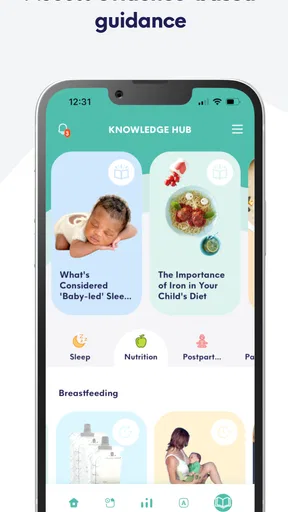
Because the current version is 1.21.1, I would pay attention to whether future development keeps the central actions quick. The most meaningful improvement would not necessarily be adding more categories or more planning layers. It would be making shared updates effortless, keeping the schedule understandable, and ensuring that development guidance feels supportive rather than prescriptive.
Existing users should watch how comfortably the app handles changing family roles and routines. A baby’s needs evolve, and a tool that works during one stage may need to remain clear when sleep, feeding, and caregiving patterns change. New users should watch their own household’s behaviour: if the app becomes part of handovers within a few days, it is probably solving a real problem; if everyone returns to scattered messages, a simpler option may be better.
My overall view is positive, with a clear condition. Onoco is most convincing as a shared coordination tool, not merely as another place to record events. The free entry point makes it reasonable to try, and the combination of family organisation, development planning, and scheduling gives it more depth than a basic log. The paid options mean I would test the everyday workflow first, especially with every caregiver who needs to participate.
I would recommend it to families who want a common record and a flexible plan for the day. I would skip it if I wanted an ultra-minimal tracker, disliked routine logging, or expected a schedule to remove uncertainty. For the right household, though, the real benefit is fewer information gaps during ordinary handovers. That is a modest promise, but in daily parenting it can make a noticeable difference.
Verdict
Strengths of Onoco - Shareable Baby tracker
- Easy-to-use shared tracking for feeding, sleep, and diaper changes.
- Keeps caregivers updated with synchronized baby-care information.
- Useful routines and logs help identify patterns over time.
- Supports multiple caregivers, including parents and childcare providers.
- Helpful reminders can reduce missed feeds, naps, or medication times.
Limitations of Onoco - Shareable Baby tracker
- Some advanced features may require a paid subscription.
- All caregivers need reliable internet for timely synchronization.
- Initial setup can feel time-consuming when entering baby details.
- Frequent tracking may feel overwhelming during especially busy days.
- Privacy-conscious parents may hesitate to store sensitive baby data online.
Similar Picks in This Category
View All
Family Space
Motorola Mobility LLC.3.9

شرطة الأطفال - مكالمة وهمية
Oub Apps4.1

Findmykids: Parental Control
LETEM LTD4.6

Pregnancy + | Tracker App
Philips Electronics UK Limited4.8

Policía de niños - para padres
Kids police4.7

Pregnancy App
Amila4.9
Frequently Asked Questions
What is Onoco – Shareable Baby Tracker used for?
Onoco is a baby-tracking app designed to help parents, relatives, and caregivers record and coordinate daily care. You can use it to log feeding, sleep, diaper changes, pumping, medication, growth details, and other routines. Its shared approach is especially useful when several people look after the same child and need access to consistent, up-to-date information.
Can multiple caregivers use the same Onoco baby profile?
Yes. Onoco is built around shared caregiving, allowing parents and approved caregivers to contribute to the same child’s records. This can make handovers between parents, grandparents, babysitters, and childcare providers more organized. Before sharing access, review the invitation and permission options carefully, since the amount of information another person can view or edit may depend on the account setup and available app features.
What information can I track in Onoco?
The app supports tracking many common aspects of infant care, including feeding sessions, bottles, breastfeeding, pumping, sleep, diaper changes, medicines, activities, and growth-related information. The exact categories and tools may vary according to the current version of the app, your child’s age, and your subscription or account type. It should be treated as a practical log rather than a medical diagnosis tool.
Does Onoco replace advice from a doctor or healthcare professional?
No. Onoco can help you organize observations and create a useful record to discuss with a pediatrician, health visitor, or other qualified professional, but it does not diagnose illnesses or determine treatment. If your baby has concerning symptoms, feeding difficulties, unusual sleepiness, breathing problems, a high temperature, or any urgent change in condition, contact an appropriate healthcare service instead of relying only on information recorded in the app.
Is Onoco free to download, and are there in-app purchases?
Onoco may be available to download without an upfront charge, but some features, plans, or extended tracking tools can depend on the current subscription model. Pricing, trial periods, and included functionality may differ between Android and iOS and can change over time. Check the app-store listing and the in-app subscription screen before confirming payment, and review renewal terms if you decide to start a trial or paid plan.
